Timz Ham Radio Page How To Communicate to a device that has a static IP address
* Connect your computer directly to the device via eithernet cable
Disconnect any access to the internet by your computer. If you access the internet via WiFi, then disable WiFi on your computer during this.The following is using Windows XP; though it should be similar to other OS's
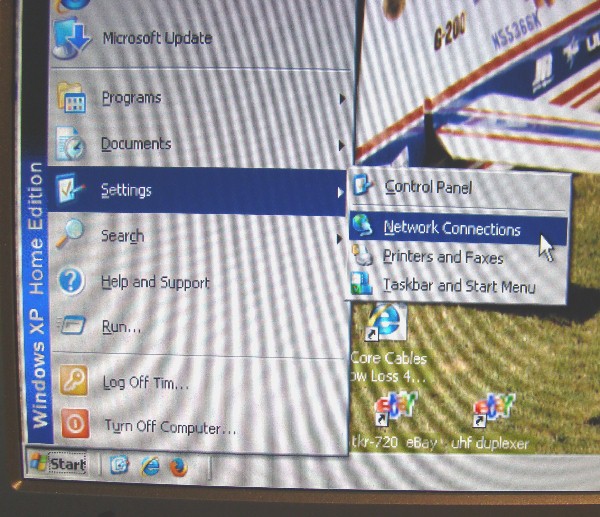
* Click on Start, Settings, Network connections (if you don't see "Network Connections"... go into "Control Panel" and find it there)
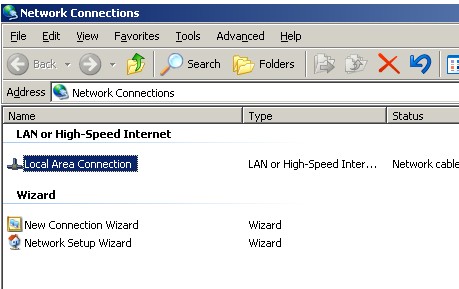
* Right Click on Local Area Connection... select Properties
* Single-left-click on Internet Protocol (TCP/IP), and then click on Properties
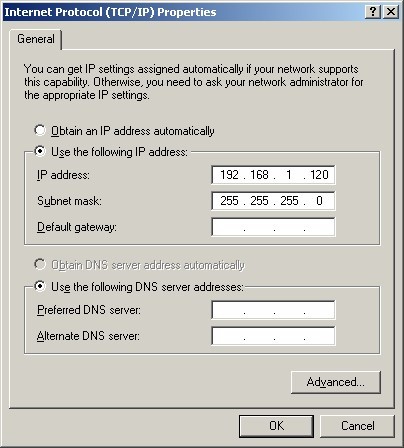
* Click on the circle to the left of: Use the Following IP address. Here is where you manually type in an IP address that is slightly higher than the static IP of the device you wan to connect to. The camera I am attempting to connect to directly was assigned a static address by the mfgr as 192.168.1.110. For the IP Address field , you type in something slightly higher. In this specific - you'd type in 192.168.1.120
* Type in the following into the IP address field: 192.168.1.120 (press Tab after entering the"120")
* The Subnet mask should automatically fill in: 255.255.255.0
* Click OK
* Wait 30 seconds, and open a browser window, enter in this URL: 192.168.1.110
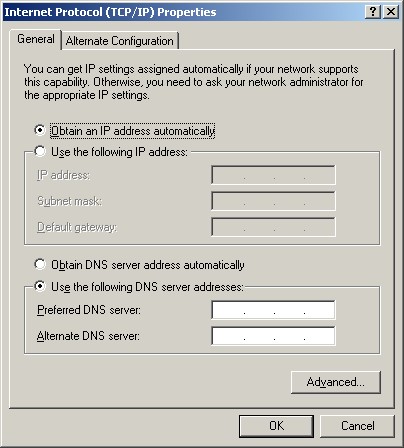
you should see the device page (assuming it's assigned static IP address is the one you just entered above).When finished with your tasks there, do the same steps above all over again to your computer, except click on Obtain an IP address automatically
click on OK and you're back to where you originally were.
To return to Camera page (use your browsers BACK button) or click here
How to resurrect a dead Ubiquiti from a corrupted flash